 net-merge
Use all your internet connections at the same time.
net-merge adds up your Wi-Fi, Ethernet and phone hotspot, so downloads, games and browsers get the speed of all of them. Free for Windows, macOS and Linux.
irm https://raw.githubusercontent.com/rohit267/net-merge/main/install.ps1 | iex
Paste it into PowerShell and approve the admin prompt. Antivirus blocked it? Download net-merge-setup.exe and double-click it.
net-merge runs on computers. Open this page on your Windows, Mac or Linux computer to install it.
Where it helps
Apps that open many connections at once get faster:
- Steam and other game downloads
- Web browsers loading pages
- Download managers like IDM, and torrents
- Cloud uploads like Google Drive
- System updates
Where it does not
One single connection always uses one link. So one big file from one server does not get faster.
Browsers can split a download into parts. In Chrome, Edge or Brave, turn on
chrome://flags/#enable-parallel-downloading (use edge:// or
brave:// in those).
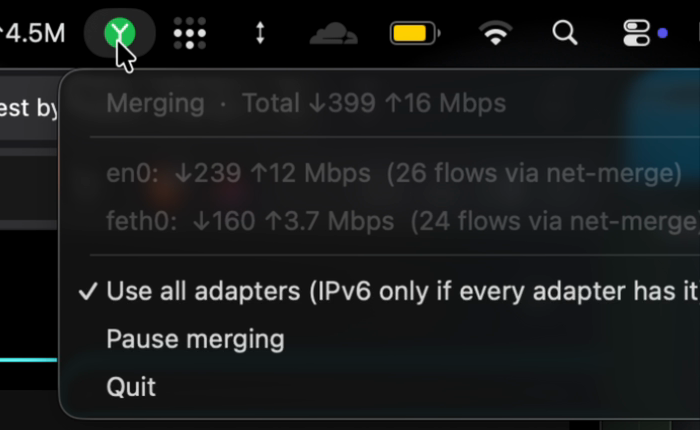
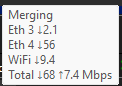
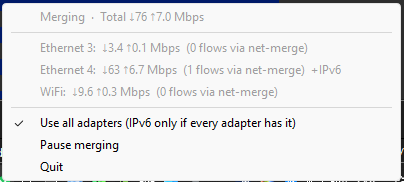
It lives in your menu bar or tray
See each connection's speed, pause merging, or turn it off.
Good to know
- No account, no server, no VPN.
- It all runs on your computer. Your traffic goes straight out through your own connections.
- Safe to stop.
- If net-merge quits or crashes, your internet keeps working as before.
- Smart about slow links.
- Faster connections get more traffic. A connection with no internet gets none until it works again.
- Your phone counts.
- No second connection? Plug your phone in over USB and turn on USB tethering, or join its hotspot. How to add one
- Open source.
- MIT license. Read the code on GitHub
Other ways to install
Homebrew, apt, dnf, zypper, apk, pacman, Nix, the Windows installer and a portable zip: step by step in the README. Something wrong? Check Troubleshooting or open an issue.
Questions
Can I use Wi-Fi and Ethernet at the same time?
Yes. net-merge sends each new connection over one of them, so apps that open many connections use both. You only get more speed when each one has its own internet line: Wi-Fi and Ethernet from the same router share one line.
Can I combine Wi-Fi and mobile data on my computer?
Yes. Connect your phone over USB and turn on USB tethering, or join its hotspot. net-merge uses it next to your Wi-Fi or Ethernet.
Will one big download get faster?
Only if it uses several connections. One connection always goes over one link. Download managers, Steam and browsers with parallel downloading open several, so they speed up.
Does it work with a VPN?
Not with a VPN app on the same computer: the VPN takes all the traffic first. Set up the VPN on your routers instead, and net-merge works as normal.
Is it free? Does it send my data anywhere?
It is free and open source. There is no account and no server: your traffic goes straight out through your own connections. The app only connects to 1.1.1.1 and 8.8.8.8 to check that each connection has internet, and to GitHub to look for a new version.